Fingerprint smart deadbolts make front-door access faster and more convenient by replacing traditional keys with biometric entry, PIN codes, smartphone apps, or backup keys. The best models balance dependable recognition with strong security, simple installation, and battery life that fits your routine.
We compared 10 popular options across connectivity, access methods, durability, installation, and practical features so you can find the right lock for a home, rental, office, or guest-access setup.
Best 10 Fingerprint Smart Deadbolts Picks for 2026
Best Overall

- Six unlocking methods, including fingerprint and Wi-Fi app control
- Up to eight months of battery life
- BHMA Grade 3 and IP53-rated design
Best For: Homeowners wanting versatile entry and built-in remote control
Best Value
TEEHO TE002 Fingerprint Deadbolt

- Supports 20 fingerprints and 20 passcodes
- Up to 365 days of battery life
- Includes silent, away, and anti-peep modes
Best For: Households wanting affordable local biometric access
Best for Smart Homes

- Stores up to 50 fingerprints and 50 access codes
- Built-in Wi-Fi plus Matter over Thread support
- Up to 18 months of stated battery life
Best For: Connected homes needing flexible access management
Best Battery Backup
DESLOC B200 Fingerprint Smart Lock

- Supports up to 50 fingerprints and seven access methods
- Up to 12 months of battery life
- USB-C emergency power port included
Best For: Users prioritizing flexible entry and backup power
Best for Easy Setup

- 0.5-second AI-learning fingerprint scanner
- Built-in Wi-Fi and Wyze app control
- USB-C emergency power and backup keys
Best For: Homeowners wanting versatile access and remote control
Best Weather Resistance
Yamiry YR02 Smart Fingerprint Deadbolt

- IP66 weather-resistant construction
- Five unlocking methods and auto-lock
- Optional gateway enables remote Wi-Fi control
Best For: Weather-exposed doors and simple DIY installation
Best for Remote Access Management
Veise VE017 Fingerprint Smart Lock

- Multiple unlock methods, including fingerprint, app, codes, fob, and key
- Flexible temporary, recurring, and permanent access codes
- Local AES-128 data storage with activity logs and alerts
Best For: Families, rentals, and multi-tenant properties needing detailed access control
Best for Families and Rentals
Sifely Fingerprint Keypad Deadbolt

- Five entry methods with capacity for over 100 fingerprints and codes
- App-based schedules, electronic keys, and access logs
- Auto-lock, privacy mode, passage mode, and anti-peep passcodes
Best For: Homes, apartments, and vacation rentals with multiple users
Best for Simple Bluetooth Entry
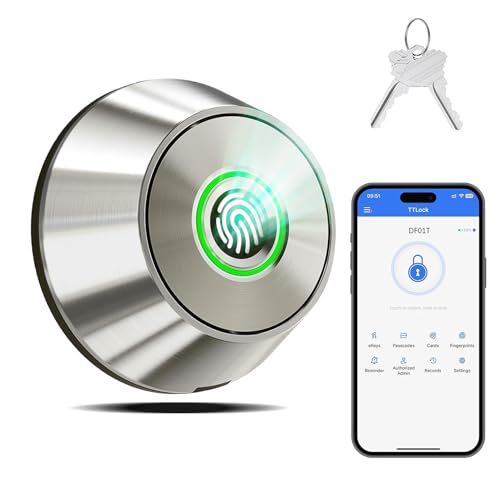
- Fingerprint, Bluetooth app, and backup-key access
- Stores up to 100 fingerprints with entry records in the app
- DIY installation with 10–90-second auto-lock settings
Best For: Homeowners wanting straightforward Bluetooth entry and key backup
Best Overall – eufy Security Smart Lock C220
The eufy Security Smart Lock C220 is a versatile choice among fingerprint smart deadbolts, combining fast fingerprint entry with built-in Wi-Fi, app control, and several backup unlocking methods. Its self-learning fingerprint recognition and broad feature set make it practical for a primary entry door.
Best For: Homeowners wanting built-in Wi-Fi, multiple unlocking options, and eufy ecosystem integration.
Pros:
- Offers six entry methods, including fingerprint, app, keypad, physical key, Apple Watch, and voice control.
- Built-in Wi-Fi enables remote control without a bridge.
- Up to eight months of battery life with eight AA batteries.
- BHMA Grade 3 certification, IP53 water resistance, and a stated 100,000-cycle durability test.
Cons:
- The eight AA batteries are more than some comparable locks require.
- Battery life varies with usage.
- Compatibility depends on the existing deadbolt and door bore dimensions.
Choose the C220 if remote access and ecosystem features matter as much as fingerprint entry. It is especially appealing for eufy users, though shoppers should confirm door compatibility before installation.
Best Value – TEEHO TE002 Fingerprint Deadbolt
The TEEHO TE002 is a straightforward option for shoppers comparing fingerprint smart deadbolts without needing app or hub connectivity. It focuses on quick biometric access, keypad entry, temporary PINs, and useful household features such as silent and away modes.
Best For: Families, renters, and households seeking simple fingerprint and keypad access.
Pros:
- Stores up to 20 fingerprints and 20 passcodes, with one-time PIN support.
- Fingerprint recognition is designed to respond in about 0.3 seconds.
- Up to 365 days of battery life from four AA batteries.
- Includes anti-peep passcodes, wrong-entry lockout, auto-lock, and silent mode.
Cons:
- It has no app or remote connectivity.
- Four AA batteries are not included.
- Installation is limited to doors with 2-1/8-inch, or 54 mm, holes.
The TE002 is a good fit when local, keypad-and-fingerprint access is the priority. Its lack of connected features may be a drawback for anyone who wants remote monitoring or smartphone management.
Best for Smart Homes – ULTRALOQ Bolt SE WiFi
The ULTRALOQ Bolt SE is one of the more connected fingerprint smart deadbolts, with built-in Wi-Fi, broad access management, and Matter over Thread support. It can handle fingerprints, passcodes, app access, web control, eKeys, voice assistants, and physical keys.
Best For: Smart-home users who want extensive access sharing and Matter compatibility.
Pros:
- Supports up to 50 fingerprints and 50 access codes.
- Built-in Wi-Fi enables remote control, activity history, notifications, and shared access.
- Matter over Thread support connects with compatible ecosystems when a Thread Border Router is available.
- Rated for up to 18 months of battery life and IP65 water resistance.
Cons:
- Matter remote access requires a compatible Matter over Thread hub.
- Wi-Fi support is limited to 2.4 GHz.
- A door sensor is not included.
The Bolt SE is compelling for connected homes that need detailed access management and automation options. Its most advanced Matter features require extra compatible infrastructure, so simpler setups may not use its full capabilities.
Best Battery Backup – DESLOC B200 Fingerprint Smart Lock
The DESLOC B200 combines fingerprint access with PIN codes, app control, eKeys, key fobs, physical keys, and optional voice control. As fingerprint smart deadbolts go, it stands out for its USB-C emergency power port, long stated battery life, and support for up to 50 fingerprints.
Best For: Users who want many access methods and an emergency power option.
Pros:
- Supports seven access methods, including fingerprint, PIN, app, eKeys, key fobs, keys, and optional voice control.
- Self-learning fingerprint recognition is designed to unlock in less than 0.3 seconds.
- Stores up to 50 fingerprints and offers up to 12 months of battery life.
- Includes a low-battery indicator and USB-C emergency power port.
Cons:
- Alexa and Google Assistant voice control requires the separately sold G2 Gateway.
- The TTLock app uses Bluetooth, while broader remote management also requires the G2 Gateway.
- Four AA batteries are not included.
The B200 is a practical pick for households that value backup access and emergency power flexibility. It offers a strong feature set locally, but shoppers should budget for the optional gateway if they want remote or voice control.
Best for Easy Setup – WYZE Auto-Lock Bolt v2
For shoppers comparing fingerprint smart deadbolts, the WYZE Auto-Lock Bolt v2 combines quick biometric entry with built-in Wi-Fi and several backup methods. Its fingerprint scanner is designed to unlock in 0.5 seconds, while the Wyze app supports remote lock management.
Best For: Homeowners who want fingerprint access, remote control, and multiple backup unlocking options.
Pros:
- AI-learning fingerprint scanner with a stated 0.5-second unlock speed.
- Built-in Wi-Fi enables remote management through the Wyze app.
- Includes keypad, physical-key, app, and fingerprint access options.
- Up to eight months of battery life, plus USB-C emergency power.
Cons:
- Uses eight AA batteries, which are included but will eventually need replacement.
- Remote features may be most useful within the Wyze ecosystem, including compatible video doorbells.
The WYZE model is a well-rounded choice when convenience matters as much as biometric entry. Its emergency USB-C power option and backup keys add useful reassurance if the batteries run down.
Best for Access Management – Veise VE012W WiFi Fingerprint Smart Lock
The Veise VE012W is one of the more access-focused fingerprint smart deadbolts, offering fingerprint, app, PIN, key, and voice entry. Built-in 2.4GHz Wi-Fi allows remote control without a separate hub, while access logs and notifications help track activity.
Best For: Families, rentals, and homes that need customizable codes, activity records, and remote access management.
Pros:
- Supports fingerprints, app access, physical keys, voice commands, and multiple PIN types.
- Stores up to 20 fingerprints and supports 100 custom PINs, according to the supplied notes.
- Built-in Wi-Fi enables remote locking, unlocking, status checks, and access programming.
- Offers real-time alerts and detailed access logs showing users, methods, and times.
Cons:
- Eight AA batteries are required but are not included.
- Its BHMA/ANSI Grade 3 rating is a residential-grade specification rather than a higher listed grade.
- Remote features depend on the app and 2.4GHz Wi-Fi connection.
Choose the Veise when managing different users is a priority. Its range of temporary, recurring, and permanent credentials makes it particularly practical for guests, service providers, or rental properties.
Best Weather Resistance – Yamiry YR02 Smart Fingerprint Deadbolt
The Yamiry YR02 is a practical fingerprint smart deadbolt for shoppers who want keyless entry with flexible installation and weather protection. It supports fingerprint, app, passcode, key-fob, and physical-key access, while Bluetooth handles local app control; remote Wi-Fi control requires a separately sold gateway.
Best For: Standard American wood doors and buyers who prioritize weather resistance, simple installation, and multiple entry methods.
Pros:
- Offers five unlocking methods, including fingerprint, app, passcode, key fob, and physical key.
- AI fingerprint processing supports fixed and self-learning fingerprints.
- IP66 weather resistance and an operating range of -22°F to 158°F.
- Installs with a screwdriver and includes auto-lock, one-touch locking, and anti-peep protection.
Cons:
- Bluetooth app control is limited to about six feet without the optional Wi-Fi gateway.
- The Wi-Fi gateway is sold separately for control from anywhere.
- The supplied notes indicate that only two fixed and three self-learning fingerprints are retained.
The Yamiry is a strong fit for an exposed entry door or anyone seeking straightforward installation. Factor in the additional gateway cost if remote, whole-home access is important.
Best for Remote Access Management – Veise VE017 Fingerprint Smart Lock
The Veise VE017 stands out among fingerprint smart deadbolts for its detailed user management and locally stored access data. Its fingerprint reader, app controls, codes, fob support, and mechanical-key backup make it adaptable for busy homes or properties with multiple users.
Best For: Families, multi-tenant properties, and owners who want remote permission management and activity logs.
Pros:
- Supports fingerprint, app, codes, fob cards, voice assistants with the optional G1 Gateway, and a mechanical key.
- Offers one-time, temporary, permanent, and recurring access codes.
- Stores entry data, credentials, and fingerprints locally with AES-128 encryption.
- Includes anti-peeping PIN entry, intrusion alerts, away mode, and adjustable auto-lock timing.
Cons:
- Alexa and Google Assistant compatibility requires the G1 Gateway.
- The supplied notes truncate the battery-life specification after stating at least 12 months.
Choose the VE017 if managing different users is as important as keyless entry. Its broad access options and detailed controls make it particularly useful for rental or shared properties, while the local data storage adds a privacy-focused touch.
Best for Families and Rentals – Sifely Fingerprint Keypad Deadbolt
This Sifely model is one of the more versatile fingerprint smart deadbolts for households, apartments, and vacation rentals. It combines biometric entry with keypad codes, app control, key fobs, and a mechanical-key backup, while scheduled permissions and access logs help simplify shared entry.
Best For: Families, tenants, guests, and short-term rental users who need several access methods.
Pros:
- Supports five unlocking methods and can store more than 100 fingerprints and access codes.
- Provides scheduled permissions, electronic key sharing, and access logs through the Sifely app.
- Offers auto-lock, one-touch locking, privacy mode, passage mode, anti-peep codes, and low-battery alerts.
- Designed for DIY installation on compatible standard doors and supports left- and right-handed configurations.
Cons:
- Remote management requires the separately sold Sifely WiFi Gateway.
- Voice control with Alexa or Google Assistant also requires the optional gateway.
The Sifely is a practical choice when different people need different ways to enter. Its large user capacity and scheduling tools suit rentals and shared homes, though remote and voice features add the cost of a separate gateway.
Best for Simple Bluetooth Entry – TTLock Fingerprint Deadbolt
This compact fingerprint smart deadbolt focuses on straightforward entry and easy installation. It offers fingerprint access, Bluetooth app unlocking within 15 meters, and two backup keys, along with user management, entry records, battery monitoring, and adjustable auto-lock timing.
Best For: Homeowners seeking a simple Bluetooth fingerprint lock with key backup and DIY installation.
Pros:
- Provides fingerprint, Bluetooth app, and mechanical-key unlocking.
- Stores up to 100 fingerprints and supports entry-record review through the TTLock app.
- Offers auto-lock settings from 10 to 90 seconds plus one-touch locking and unlocking.
- Designed to install with a screwdriver in about 15 minutes on most US doors.
Cons:
- App unlocking is limited to a Bluetooth range of about 15 meters.
- It does not list Wi-Fi or remote access in the supplied features.
- The product provides only three unlocking methods compared with some multi-method alternatives.
The TTLock model is a good fit for buyers who want biometric convenience without a more involved connected-home setup. Its local Bluetooth approach, key backup, and uncomplicated installation keep the feature set focused on everyday residential use.
How We Picked the Best Fingerprint Smart Deadbolts
We focused on the features that matter after installation, not just impressive specifications. Each pick was considered for fingerprint-reader convenience, keypad usability, app functionality, lock compatibility, battery performance, and the availability of backup entry methods. We also looked for options suited to different priorities, including budget-friendly access, Wi-Fi control, Matter compatibility, weather resistance, and simplified installation.
Because smart-lock performance depends on the door and existing hardware, verify your deadbolt dimensions and backset before ordering. A lock with excellent features is still a poor fit if the latch, strike plate, or interior assembly does not align correctly.
Quick Comparison
- Best all-around convenience: Look for a model combining fingerprint entry, PIN codes, app control, and a physical-key fallback.
- Best for remote access: Choose a Wi-Fi-connected lock or one that supports a compatible hub, especially for checking status and managing access away from home.
- Best for smart-home integration: Matter support can simplify compatibility across supported ecosystems, but confirm which functions your platform supports.
- Best for basic keyless entry: A Bluetooth or keypad-focused lock may cost less and use fewer connected features while still eliminating daily key use.
Key Buying Factors for Fingerprint Smart Deadbolts
Fingerprint Reliability
Look for a responsive sensor that recognizes authorized users consistently. Finger placement, wet hands, dirt, and extreme temperatures can affect biometric readers, so keypad and app access are valuable backups.
Connectivity and App Control
Bluetooth is often sufficient for nearby unlocking and setup. Wi-Fi enables remote management, notifications, guest codes, and lock-status checks, but it may increase battery use. Review app permissions, supported devices, and subscription requirements before buying.
Security and Backup Access
Prioritize encrypted app communication, automatic locking controls, one-time or scheduled codes, tamper alerts, and a dependable emergency power option. A physical key, USB power input, or external battery terminals can be important if the batteries run flat.
Installation and Door Compatibility
Most retrofit deadbolts are designed for standard single-cylinder doors, but measurements still vary. Check door thickness, backset, latch style, interior clearance, and whether the lock replaces only the interior thumb turn or the entire deadbolt assembly.
Battery Life and Outdoor Durability
Battery estimates vary with Wi-Fi use, temperature, traffic, and auto-lock settings. Choose weather-resistant construction for exposed doors and consider models with clear low-battery warnings. IP ratings are useful indicators, but they do not replace correct installation and weather protection.
Who Should Buy Which Fingerprint Smart Deadbolts?
Choose a feature-rich Wi-Fi model if you manage guests, deliveries, family access, or a rental property and want remote status checks and code management. Choose a Matter-compatible model if cross-platform smart-home integration is a priority and your controller supports the functions you need.
Choose a straightforward keypad and fingerprint lock for a primary home where local keyless entry matters more than remote controls. Choose a weather-resistant option for a porch, side gate, or other exposed entrance. Finally, renters and DIY users should prioritize reversible installation, clear instructions, and compatibility with the existing deadbolt before comparing advanced features.