Finding the right emergency alert is harder for renters, who often need reliable protection without drilling, rewiring, or replacing a landlord-installed system. The best wireless panic buttons for renters offer simple placement, quick activation, and alerts that reach the right people.
This roundup compares security-system buttons, caregiver call systems, Wi-Fi devices, and standalone SOS alarms so you can match features, monitoring, range, and ongoing costs to your home.
Best 10 Wireless Panic Buttons for Renters Picks for 2026
Quiet Home Safety

- One-press alarm trigger
- Audible or silent alert options
- Up to five years of battery life
Best For: SimpliSafe Gen 3 users wanting simple, renter-friendly installation
Connected Emergency Access
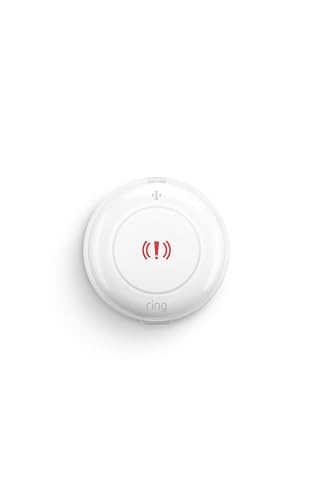
- Alerts contacts with a press and hold
- Amazon Sidewalk helps during Wi-Fi drops
- Up to three years of battery life
Best For: Ring users seeking quick emergency access around the home
Whole-Home Care Alerts
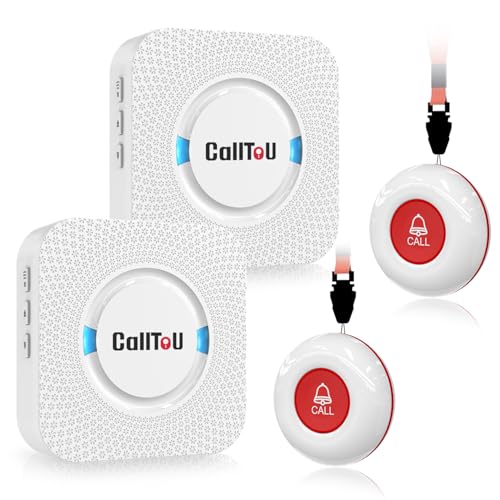
- Two buttons and two receivers included
- 500-plus-foot stated open-area range
- Loud alerts with adjustable volume
Best For: In-home caregiving and room-to-room assistance
Flexible Alarm Coverage

- Silent or full-volume alarm modes
- Wireless design with seven-year battery life
- Add multiple buttons to an abode system
Best For: abode users expanding panic-button coverage in a rental
Simple Plug-In Alert
CallToU Wireless Caregiver Pager

- 500+ ft open-area receiver range
- 55 tones and five volume levels
- Wearable or mountable call button
Best For: Renters wanting a simple local alert system
Connected SOS Option

- Requires compatible eufy HomeBase
- IP65 dust- and water-resistant design
- Keychain, lanyard, or wall mounting
Best For: Renters already using a supported eufy HomeBase
Smartphone-Ready Alert

- 2.4GHz Wi-Fi app notifications
- Includes call and watch buttons
- Shared alerts through the Tuya app
Best For: Renters wanting local and smartphone-based alerts
Best Wi-Fi Pick
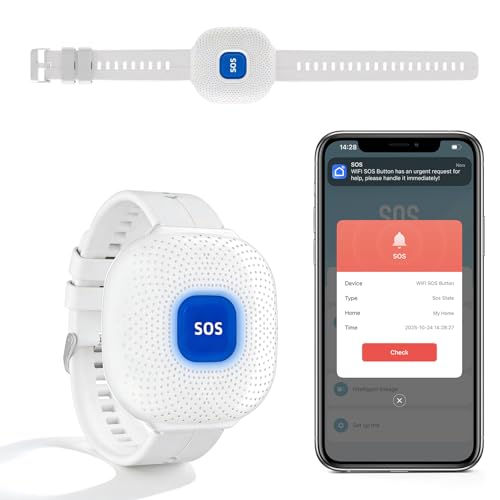
- Phone alerts through Tuya Smart or Smart Life
- Silent operation with flashing indicator
- IP66 rating and up to six months standby
Best For: Renters with dependable 2.4GHz Wi-Fi who want discreet caregiver alerts
Best Loud-Alarm Setup
130dB Wireless Emergency System

- Two panic buttons plus one siren
- Adjustable volume up to 130dB
- 350-foot stated range and flexible alarm modes
Best For: Renters who prefer an audible, local alarm over app notifications
Best Expandable Option

- Two compact wireless call buttons
- Uses included AAA batteries
- Designed for compatible SanJie pager receivers
Best For: Renters adding call points to an existing compatible SanJie setup
Quiet Home Safety – SimpliSafe Panic Button
For renters already using SimpliSafe, this wireless panic button offers a straightforward way to trigger an alarm without reaching for a phone. It supports audible or silent alerts, and its peel-and-stick setup avoids a complicated installation.
Best For: SimpliSafe Gen 3 users who want an easily mounted panic button near a bed, entryway, or other accessible location.
Pros:
- Triggers an alarm with one press.
- Supports customizable audible or silent panic alerts.
- Peel-and-stick or hardware installation options.
- Battery life can reach up to five years, depending on usage.
Cons:
- Requires a compatible SimpliSafe Gen 3 system.
- Professionally monitored emergency response requires a monitoring plan.
This is a particularly convenient choice for renters who already have SimpliSafe equipment and want a compact, flexible alert control with minimal setup.
Connected Emergency Access – Ring Panic Button
Among wireless panic buttons for renters, the Ring Panic Button is designed for quick access around the home without requiring a phone. Press and hold the button to alert emergency contacts through the Ring app, while Amazon Sidewalk can help maintain connectivity if Wi-Fi drops.
Best For: Ring households that want a portable emergency button by the bed, in the kitchen, or in another frequently used area.
Pros:
- Press-and-hold operation for quickly alerting emergency contacts.
- Can request supported emergency response with a compatible Ring subscription.
- Can remain connected through Amazon Sidewalk during an internet outage.
- Offers up to three years of battery life.
Cons:
- Requires a Ring base station according to the product title.
- Emergency response features require a compatible subscription and are sold separately.
This button is a practical fit for Ring users who want an accessible way to request help and appreciate added connectivity options beyond standard Wi-Fi.
Whole-Home Care Alerts – CallToU Caregiver Pager
This CallToU caregiver pager provides a self-contained alternative to app-based wireless panic buttons for renters. The package includes two call buttons and two plug-in receivers, allowing a resident to request help while caregivers receive loud alerts in different rooms.
Best For: Renters caring for seniors, patients, or people with disabilities who need loud, whole-home call alerts.
Pros:
- Includes two call buttons and two receivers.
- Offers a stated open-area range of more than 500 feet.
- Receivers provide 55 ringtone choices and five volume levels up to 110 dB.
- Waterproof and dustproof call buttons and receivers.
Cons:
- Receivers need to be plugged into electrical outlets.
- It functions as a caregiver pager rather than a professionally monitored emergency system.
- The call buttons use included 12V alkaline batteries.
With multiple buttons, receivers, and adjustable loudness, this setup is well suited to in-home caregiving where hearing an alert across rooms matters more than app-based monitoring.
Flexible Alarm Coverage – abode Panic Button
Abode Panic Button | Trigger Your Alarm & Alert All Users with The Touch of A Button
Check Price On AmazonThe abode Panic Button gives renters with an abode system a wireless way to trigger an alarm from a convenient location. It can be configured for a silent or full-volume alarm and mounted where an extra point of access is most useful.
Best For: abode Iota or Smart Security Kit users who want additional panic-button coverage around a rental.
Pros:
- Can trigger either a silent or full-volume alarm.
- Multiple buttons can be added to cover vulnerable points.
- Completely wireless with a stated seven-year battery life.
- Wall-mount design supports fixed placement.
Cons:
- Requires an abode gateway, such as the Iota or Smart Security Kit.
- Not a standalone panic button.
For renters already invested in abode, this is a simple way to extend alarm access throughout the home while retaining a choice between discreet and audible alerts.
Simple Plug-In Alert – CallToU Wireless Caregiver Pager
For renters seeking wireless panic buttons for renters, this CallToU system provides a straightforward alert setup without requiring permanent installation. The portable receiver offers a listed 500+ ft open-area range, while the call button can be worn, mounted, or carried.
Best For: Renters who want a simple, portable caregiver alert for use around an apartment or home.
Pros:
- Plug-in receiver with a listed 500+ ft open-area range
- Call button supports pendant, bracket, or adhesive mounting
- 55 ringtone choices and five volume levels, up to 110 dB
- Call button and receiver are described as waterproof and dustproof
Cons:
- Receiver must remain connected to an electrical outlet
- Designed primarily as a local receiver system rather than a phone-connected alert
This is a practical choice when you need an easy-to-set-up alert button and audible receiver, but it does not provide the app-based remote notifications found in more connected systems.
Connected SOS Option – eufy Wireless Panic Button
This eufy model is a compact option for shoppers comparing wireless panic buttons for renters, especially those already using a compatible eufy HomeBase. Its one-touch design, weather-resistant housing, and flexible mounting options make it easy to place where help may be needed.
Best For: Renters who already own a supported US-version eufy HomeBase and want a wearable or wall-mounted SOS button.
Pros:
- Long-press operation sends an emergency alert
- IP65-rated dust- and water-resistant design
- Can attach to a keychain, lanyard, or wall
- Listed maximum range of 656 feet
Cons:
- Requires a compatible HomeBase to operate
- Compatibility is limited to specified HomeBase models and updated software
The button is a strong fit within an existing eufy setup, but renters starting from scratch should account for the required HomeBase before choosing it.
Smartphone-Ready Alert – CallToU Wi-Fi Caregiver Pager
For renters looking for wireless panic buttons for renters with phone access, this CallToU package adds app notifications to a local receiver. It supports a 2.4GHz Wi-Fi connection, includes a call button and watch button, and can share alerts with family members through the Tuya app.
Best For: Renters who want local audible alerts plus smartphone notifications and shared family access.
Pros:
- Supports app notifications through 2.4GHz Wi-Fi
- Includes one call button, one watch button, and one receiver
- Offers a listed 328 ft range and wall penetration
- Provides 20 ringtones, five volume levels, and customizable button names
Cons:
- Supports 2.4GHz Wi-Fi only, not 5GHz
- Phone or text message notifications require a stated $9.99/month subscription
- Wi-Fi setup is more involved than a basic plug-in pager
This system offers the most flexible notification approach of the three, though its Wi-Fi requirement and optional subscription should be considered before purchase.
Best Wi-Fi Pick – App-Connected Panic Button
For renters looking for wireless panic buttons for renters, this Wi-Fi model offers phone-based alerts without a monthly fee. It connects to Tuya Smart or Smart Life over a 2.4GHz Wi-Fi network, so it can notify shared caregivers even when they are away.
Best For: Renters who want discreet, app-based emergency notifications and already have reliable 2.4GHz Wi-Fi.
Pros:
- Push notifications go directly to a connected phone.
- Silent operation with a flashing green indicator helps avoid disturbing others.
- IP66 water resistance, portable design, and up to six months of standby time.
- Supports shared access for multiple family members or caregivers.
Cons:
- Requires a constant 2.4GHz Wi-Fi connection and is not intended for outdoor use.
- Depends on the Tuya Smart or Smart Life app and internet access for phone alerts.
This is a practical renter-friendly choice when discreet alerts matter more than a local siren. Confirm your home network supports 2.4GHz Wi-Fi before buying.
Best Loud-Alarm Setup – 130dB Wireless Emergency System
This wireless panic button system is a straightforward option for renters who want an audible and visual alert without relying on a phone app. It includes two call buttons and a siren with a stated range of up to 350 feet.
Best For: Renters who need a prominent in-home alarm for bathrooms, bedrooms, or other areas where a loud alert is useful.
Pros:
- Adjustable alarm volume reaches up to 130dB.
- Two buttons provide coverage for more than one location or user.
- Momentary and toggle modes offer different triggering options.
- Alarm duration can be set to manual shutoff or automatic stops from 5 to 20 seconds.
Cons:
- The siren requires batteries and produces a loud alert that may disturb neighbors in close quarters.
- It is a wall-mounted system, so placement may require mounting hardware and permission in a rental.
With adjustable volume and alarm timing, this system offers more control than a basic beeper. Its local siren design is useful where immediate sound matters, but renters should choose placement carefully.
Best Expandable Option – SanJie Two-Button Call System
Wireless Call Button for Seniors - Emergency SOS Pager System with 2 Panic Buttons
Check Price On AmazonFor renters comparing wireless panic buttons for renters, this two-button SanJie set can add call points to a compatible SanJie pager setup. The buttons are compact and battery powered, but they are transmitters rather than a complete standalone alarm system.
Best For: Renters who already own, or plan to use, one of the compatible SanJie receiver models.
Pros:
- Includes two wireless call buttons for separate rooms or users.
- Uses included AAA batteries.
- Touch-controlled buttons provide a simple way to send a call.
Cons:
- Cannot be used independently and must be paired with a SANJIE pager receiver.
- Compatibility is limited to specified SanJie receiver models.
- The supplied details do not describe a standalone siren or phone-alert function.
This set makes sense as an add-on rather than a complete emergency solution. Check the receiver model carefully before ordering, especially if you are starting from scratch.
How We Picked the Best Wireless Panic Buttons for Renters
We focused on devices that can be installed with minimal or no permanent changes to a rental. Our comparison considers activation speed, wireless range, alert delivery, power requirements, mounting flexibility, compatibility, monitoring options, and total ownership cost. We also separated professionally monitored security buttons from caregiver pagers and standalone alarms, because they solve different emergency-response needs.
Before buying, confirm whether a button requires a specific base station, security subscription, Wi-Fi network, mobile app, or separate receiver. A product described as an emergency button may alert only people or devices within the same home rather than contacting emergency services.
Quick Comparison
| Type | Best for | Usually requires | Main trade-off |
|---|---|---|---|
| Security-system panic button | Renters with a compatible alarm system | Base station; monitoring may be extra | Limited ecosystem compatibility |
| Caregiver pager system | In-home assistance and senior care | Plug-in receiver or pager | Shorter local-alert focus |
| Wi-Fi smart button | App notifications and remote contacts | 2.4GHz Wi-Fi and app setup | Dependent on internet and power |
| Standalone wireless alarm | Simple audible alerts | Batteries or a receiver | May not notify anyone outside the home |
Key Buying Factors for Wireless Panic Buttons for Renters
Installation and Portability
Choose adhesive, wearable, tabletop, or wall-mount options that can move with you. Check whether adhesive pads are included and whether the button can be removed without damaging paint. Battery-powered devices are generally easier to relocate than hardwired accessories.
Alert Path and Response
Decide who must receive the alert. A loud local siren can help summon someone nearby, while an app-based device can notify selected contacts. Monitored security buttons may provide a professional response, but monitoring typically costs extra and may require the brand’s base station.
Range, Connectivity, and Reliability
Look beyond the advertised range: walls, floors, interference, and the receiver’s placement can reduce performance. Wi-Fi models need a dependable network, while radio-frequency caregiver systems may work during an internet outage but only within their stated local range. Test the button after installation.
Power and Maintenance
Review battery type, expected battery life, low-battery warnings, and whether the receiver stays plugged in. Keep backup batteries available and establish a regular test schedule, especially for devices used by older adults or people with disabilities.
Who Should Buy Which Wireless Panic Buttons for Renters?
Choose a SimpliSafe, Ring, or Abode button if you already use that ecosystem and want an integrated alarm or monitoring workflow. Select a CallToU-style caregiver pager or a standalone wireless call system when the main goal is summoning assistance inside the home. A Wi-Fi button is a better fit when trusted contacts need app notifications from outside the property, provided the internet connection is dependable. For the simplest setup, choose a battery-powered audible alarm with clear range information and a receiver that can be heard throughout the rental.