Choosing a smart lock for a busy household means balancing security, easy access, and dependable control. The best smart deadbolts for families let parents, children, guests, and service providers enter safely without relying on spare keys.
This roundup compares ten family-friendly options with features such as keypad entry, fingerprint recognition, app control, built-in handles, Wi-Fi connectivity, and Matter support. Use the guide below to narrow the list based on your door, household routines, and preferred access method.
Best 10 Smart Deadbolts for Families Picks for 2026
Best Connected Choice
ULTRALOQ Bolt SE Wi-Fi Smart Deadbolt

- Fingerprint, code, app, key, and voice entry
- Remote access without a hub via built-in Wi-Fi
- Supports Matter over Thread and up to 18-month battery life
Best For: Families needing multiple entry methods and detailed access management
Best Simple Keypad Pick

- Stores 20 family codes plus a one-time guest PIN
- Auto-lock and one-touch locking features
- No Wi-Fi or app setup required
Best For: Families wanting simple keypad access without remote connectivity
Best for Entryway Monitoring
eufy FamiLock S3 Max Video Lock

- Combines palm-vein unlocking with a 2K video doorbell
- Rear screen lets users check visitors without a phone
- Supports Matter and includes emergency battery backup
Best For: Families wanting biometric access plus front-door video monitoring
Best Handle-and-Lock Upgrade
Philips Wi-Fi Smart Front Door Lock

- Includes a matching long handle and keypad deadbolt
- Supports up to 100 custom passwords
- Remote control, alerts, and activity history via built-in Wi-Fi
Best For: Families upgrading the complete front-door entry set
Flexible Family Access
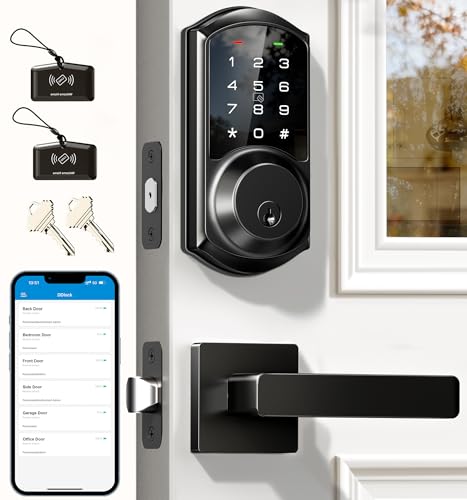
- Multiple entry methods, including codes, cards, app, and keys
- 250+ flexible codes with anti-peeping protection
- Optional gateway enables remote control and voice commands
Best For: Families, rentals, and homes with frequent visitors
Fast Fingerprint Entry

- Fingerprint unlock works in less than a second
- Built-in Wi-Fi enables remote control without a bridge
- Six unlocking methods and approximately eight-month battery life
Best For: Families seeking biometric entry and eufy ecosystem integration
Simple Shared Access
Tapo DL100 Smart Wi-Fi Deadbolt

- Up to 200 codes with family and guest profiles
- Tracks activity and sends real-time door alerts
- Tactile keypad, Wi-Fi, Bluetooth, keys, and emergency USB-C power
Best For: Families wanting managed access and tactile keypad controls
Most Flexible Fingerprint Access

- Fast fingerprint entry with multiple backup methods
- Permanent, recurring, scheduled, and one-time access codes
- Local encryption, alerts, and detailed activity logs
Best For: Families managing varied access needs for members and guests
Best Hub-Free Remote Control

- Built-in Wi-Fi enables remote control without an extra hub
- Supports fingerprints, codes, app, key, and voice access
- Stores up to 100 custom passcodes and scheduled guest codes
Best For: Families wanting convenient remote access on a 2.4GHz network
Best for Shared Household Access

- Five entry methods, including fingerprints, codes, fobs, and keys
- Supports over 100 fingerprints and over 100 access codes
- Scheduled access, logs, privacy mode, and passage mode
Best For: Families and shared properties with many users or guests
Best Connected Choice – ULTRALOQ Bolt SE Wi-Fi Smart Deadbolt
For families comparing smart deadbolts for families, the ULTRALOQ Bolt SE offers several ways to get inside, including fingerprint recognition, passcodes, app control, shared eKeys, voice control, and physical keys. Built-in Wi-Fi supports remote access without a hub, while Matter over Thread adds broader smart-home integration when paired with a compatible Thread Border Router.
Best For: Families wanting flexible access methods, remote management, and support for up to 50 fingerprints and 50 access codes.
Pros:
- Supports fingerprints, passcodes, smartphone access, eKeys, voice control, and mechanical keys.
- Built-in Wi-Fi enables remote locking, unlocking, access sharing, notifications, and activity history without a hub.
- Weather-resistant IP65 design, ANSI BHMA certification, auto-lock, and claimed battery life of up to 18 months.
Cons:
- Matter remote access requires a compatible Matter over Thread hub.
- Built-in Wi-Fi supports 2.4 GHz networks only.
- A door sensor is not included.
This is a feature-rich option for households with varied access needs. Its fingerprint capacity and detailed access controls are especially useful for larger families, while the Matter requirements may matter to shoppers building a Thread-based smart home.
Best Simple Keypad Pick – TEEHO TE001 Keypad Deadbolt
The TEEHO TE001 is a straightforward choice for families seeking smart deadbolts for families without app or Wi-Fi dependence. Its keypad supports 20 individual access codes plus a single-use guest PIN, and the lock includes auto-lock, one-touch locking, anti-peeping password protection, and backup keys.
Best For: Families who want dependable keypad entry and temporary guest access at a budget-friendly, non-connected level.
Pros:
- Stores up to 20 family access codes and offers a one-time code that deletes after use.
- Auto-lock can be set from 10 to 99 seconds, with one-touch locking available from the keypad.
- Includes a backlit keypad, low-battery alert, anti-peeping protection, IP54 weather resistance, and two backup keys.
Cons:
- It has no Wi-Fi, app, or remote-control connectivity.
- Requires four AA batteries, which are not included.
- Designed for 2-1/8-inch door holes and is not compatible with 38 mm door holes.
The TE001 keeps operation simple and avoids connected-home setup, making it practical for everyday family entry and occasional guests. Check the door-hole requirement carefully before buying, and reset the lock before first use as directed.
Best for Entryway Monitoring – eufy FamiLock S3 Max Video Lock
Among smart deadbolts for families, the eufy Security FamiLock S3 Max stands out by combining a lock, palm-vein recognition, video doorbell, and 2K camera. It can help families check visitors and the front-door status, while the rear lock screen offers a phone-free way for children or older adults to see who is outside.
Best For: Families prioritizing front-door visibility, visitor alerts, and biometric entry alongside a smart lock.
Pros:
- Palm-vein recognition unlocks in a claimed 0.6 seconds, with biometric data stored locally on the lock.
- Integrated 2K camera and 150-degree head-to-toe view help monitor visitors and packages.
- Rear lock video screen, Matter support, Apple Home compatibility, and emergency AAA battery backup add household flexibility.
Cons:
- Camera streams are not supported through Matter and require the eufy app for full camera functionality.
- Battery life is listed at up to four months, with an additional month of essential functionality from the emergency batteries.
- It is not compatible with HomeBase 2.
This is the most comprehensive option for families who want a lock and front-door monitoring system in one device. It offers useful app-free viewing, but shoppers should account for the shorter stated battery interval and eufy ecosystem limitations.
Best Handle-and-Lock Upgrade – Philips Wi-Fi Smart Front Door Lock
The Philips Wi-Fi Smart Front Door Lock is a practical renovation pick for families comparing smart deadbolts for families and needing a complete entryway update. It includes both a keypad deadbolt and matching long handle, with app, voice, password, and physical-key entry plus remote control through built-in Wi-Fi.
Best For: Families replacing both a front-door lock and handle who want extensive code management and remote access.
Pros:
- Supports up to 100 permanent, one-time, and time-based passwords for family, guests, tenants, or cleaners.
- Built-in Wi-Fi enables remote locking and unlocking without an extra hub.
- Includes auto-lock from 10 to 180 seconds, real-time alerts, activity records, voice control, and a backlit keypad.
Cons:
- Uses 8 AA alkaline batteries, which are not included.
- Wi-Fi supports 2.4 GHz networks only, with best remote performance when the router is within 65 feet.
- Installation requires checking the specified cross-bore and door-thickness dimensions.
This Philips set makes sense when a family wants the lock and exterior handle coordinated in one purchase. Its unusually large password capacity and remote activity records are useful for busy households, provided the door dimensions and battery needs fit your installation.
Flexible Family Access – Veise VE06-L Smart Deadbolt
For families, rentals, and homes with frequent visitors, the Veise VE06-L stands out among smart deadbolts for families with numerous entry options and detailed access management. It supports app control, codes, IC cards, e-keys, physical keys, and Apple Watch access, while its optional gateway adds remote control and voice-assistant compatibility.
Best For: Families, landlords, rental properties, and households that need flexible codes and multiple access methods.
Pros:
- Supports app, web portal, keypad codes, IC cards, e-keys, physical keys, and Apple Watch access.
- Stores 250+ codes, including permanent, scheduled, recurring, and one-time options.
- Offers anti-peeping code entry, access logs, adjustable auto-lock, and local AES-encrypted data storage.
- Includes a lever handle set, IP54 weather resistance, and BHMA/ANSI Grade 3 certification.
Cons:
- Remote access, battery monitoring, and voice control require the separately sold G2 gateway.
- The extensive feature set may take more setup and management than a basic keypad lock.
- Its one-year warranty is extended to two years only after product registration.
The VE06-L is a particularly adaptable choice when different family members, guests, or tenants need different credentials. Consider it if access management matters more than having built-in Wi-Fi from the start.
Fast Fingerprint Entry – eufy Security Smart Lock C220
The eufy Security Smart Lock C220 is a convenient pick among smart deadbolts for families because household members can unlock it with a fingerprint, app, keypad, physical key, Apple Watch, or voice assistant. Built-in Wi-Fi enables remote control without a separate bridge, while its self-learning fingerprint system is designed to improve recognition over time.
Best For: Families wanting quick fingerprint access, built-in remote connectivity, and easy integration with eufy devices.
Pros:
- Offers six unlocking methods, including fingerprint, app, keypad, key, Apple Watch, and voice control.
- Built-in Wi-Fi allows remote control without a separate bridge.
- Runs for around eight months on eight AA batteries, depending on usage.
- BHMA Grade 3 certified, IP53 waterproof, and rated for operating temperatures from -22°F to 158°F.
Cons:
- Battery life varies with lock usage and requires eight AA batteries.
- Its IP53 rating is lower than the IP54 rating listed for some competing models.
- Fingerprint access may not suit every family member’s preferred unlocking method.
Choose the C220 if fingerprint entry and built-in Wi-Fi are priorities. Its broad unlocking options also give family members alternatives when a fingerprint is inconvenient.
Simple Shared Access – Tapo DL100 Smart Wi-Fi Deadbolt
The Tapo DL100 is a practical option for smart deadbolts for families, combining tactile keypad buttons with app, Bluetooth, physical-key, and voice access. Its app supports separate profiles for family members and guests, while activity timestamps and real-time alerts help households keep track of access.
Best For: Families that want customizable access profiles, tactile buttons, and straightforward activity monitoring.
Pros:
- Supports up to 200 customizable codes with groups for family, guests, and visitors.
- Provides app, Bluetooth, keypad, physical-key, and voice-command unlocking.
- Offers real-time alerts, door-status checks, activity timestamps, auto-lock, and failed-attempt limiting.
- Includes IP54 weather resistance, BHMA Grade 3 certification, and a USB-C emergency power port.
Cons:
- Battery life is listed as up to 200 days in Wi-Fi mode or 300 days in Bluetooth mode, depending on use.
- Voice unlocking requires a PIN verification step.
- It uses keypad and app access rather than biometric fingerprint entry.
The DL100 makes sense for families who prefer tactile buttons and organized user profiles. It also offers useful backup options, including two physical keys and emergency USB-C power.
Most Flexible Fingerprint Access – Veise VE017 Smart Door Lock
For families comparing smart deadbolts for families, the Veise VE017 stands out for combining fast fingerprint entry with extensive access-management options. It supports app control, passcodes, fob cards, mechanical keys, and optional voice control with the G1 Gateway, while detailed activity logs help you track household and guest access.
Best For: Families who want fingerprint access, flexible guest codes, and detailed control over multiple users.
Pros:
- Supports fingerprint, app, passcode, fob, mechanical-key, and other listed unlocking methods.
- Creates permanent, recurring, duration-based, and one-time codes for family members and guests.
- Stores access data locally with AES128 encryption and provides entry alerts and activity logs.
- Fingerprint recognition is designed to unlock in under 0.2 seconds and supports ongoing recognition improvements.
Cons:
- Voice-assistant control requires the separately required G1 Gateway.
- Remote management depends on the KK Home App and compatible connectivity.
- The supplied notes indicate that it uses four AA/LR6 alkaline batteries, but do not specify included battery status.
The VE017 is a feature-rich choice for busy households that need different ways to enter and granular control over access. Its local data storage, away mode, and configurable codes add useful security and convenience for family living.
Best Hub-Free Remote Control – Philips Wi-Fi Smart Deadbolt
The Philips Wi-Fi Smart Deadbolt is a practical option for households that want smart deadbolts for families with built-in remote access. Family members can use fingerprints, passcodes, the app, physical keys, or voice control, while built-in Wi-Fi lets you manage the lock remotely without an additional hub.
Best For: Families wanting direct Wi-Fi remote control, fingerprint entry, and many customizable passcodes.
Pros:
- Offers app, passcode, fingerprint, physical-key, and Alexa or Google Assistant access.
- Built-in Wi-Fi enables remote locking and unlocking without an extra hub.
- Supports up to 100 custom passcodes plus one-time or scheduled guest codes.
- Provides real-time alerts, access history, auto-lock settings from 10 to 180 seconds, and Away Mode.
Cons:
- Supports only 2.4GHz Wi-Fi, with the lock and router recommended within 65 feet.
- Batteries are not included, and the notes specify AA alkaline batteries only.
- It does not include a door sensor.
This Philips lock offers a strong balance of family-friendly entry methods and straightforward remote management. Its hub-free Wi-Fi is convenient, but buyers should confirm their network uses 2.4GHz and account for the lack of a door sensor.
Best for Shared Household Access – Sifely Fingerprint Deadbolt
The Sifely fingerprint deadbolt is designed for households that need smart deadbolts for families alongside guest or tenant access. It combines fingerprint recognition with keypad codes, Bluetooth app control, key fobs, and a mechanical-key backup, while scheduled permissions and access logs simplify shared-home management.
Best For: Families, apartments, and rental properties needing high-capacity fingerprint and code management.
Pros:
- Supports five listed entry methods: fingerprint, passcode, app, key fob, and mechanical key.
- Handles more than 100 fingerprints and more than 100 access codes for household and guest use.
- Offers scheduled permissions, electronic key sharing, access logs, privacy mode, and passage mode.
- DIY installation is designed for compatible standard doors and supports left- and right-handed configurations.
Cons:
- Remote management requires the separately sold Sifely Wi-Fi Gateway.
- Alexa and Google Assistant compatibility also requires the optional gateway.
- The supplied notes do not specify a battery-life estimate.
The Sifely is especially adaptable where several people need different credentials, such as a busy family home or shared property. Its Bluetooth-first control works locally, while the optional gateway adds remote and voice features at additional cost.
How We Picked the Best Smart Deadbolts for Families
We focused on the features that matter most in a shared household: reliable keyless entry, multiple user credentials, remote locking and unlocking, access-code management, security notifications, and straightforward installation. We also considered whether each lock uses a keypad, fingerprint reader, app, physical key, or combination of methods.
Connectivity matters, too. Wi-Fi models can usually be controlled away from home without an additional hub, while Bluetooth-first locks may offer simpler local access but fewer remote features. We also noted practical differences such as integrated handles, tactile buttons, auto-lock settings, battery-powered operation, and compatibility with smart-home platforms.
Quick Comparison
| Feature | What to look for | Best for |
|---|---|---|
| Keypad entry | Personal codes and illuminated, easy-to-use buttons | Families sharing access without keys |
| Fingerprint entry | Fast biometric unlocking with backup methods | Older children and frequent users |
| Wi-Fi control | Remote access, alerts, and code management | Travel, deliveries, and caregivers |
| Handle set | Deadbolt and lever included together | Doors needing a coordinated replacement |
| Matter or platform support | Compatibility with a broader smart-home setup | Households using multiple ecosystems |
Key Buying Factors for Smart Deadbolts for Families
Entry Methods and Backup Access
Choose at least two dependable ways to unlock the door. Keypads are practical for children and guests, while fingerprints are convenient for regular users. A physical key or emergency power option is valuable if batteries run low or connectivity fails.
Access Management
Look for temporary and recurring codes if you host visitors, use a cleaner, or need caregiver access. App controls should make it easy to add, remove, and review users. Activity logs and lock-status alerts can provide useful visibility without requiring constant checking.
Door Fit and Installation
Confirm the lock’s compatibility with your existing borehole, backset, door thickness, and deadbolt configuration before ordering. Some models replace only the deadbolt, while others include a lever handle. Auto-lock timing should be adjustable so the door does not lock unexpectedly while family members are outside.
Power, Security, and Connectivity
Check expected battery life, low-battery warnings, and emergency charging provisions. Wi-Fi offers convenient remote control, but a stable signal near the entryway is essential. For any connected lock, use strong account credentials, enable available two-factor authentication, and keep firmware updated.
Who Should Buy Which Smart Deadbolts for Families?
Choose a keypad-focused model if several household members need simple, code-based access. A fingerprint model is better for adults and older children who want fast entry without remembering a code. Select a Wi-Fi lock if remote control, delivery access, or activity alerts are priorities.
Households replacing both the lock and door handle should favor a bundled handle-set option. Smart-home enthusiasts may prefer Matter or broader platform compatibility, while budget-conscious buyers should prioritize dependable keypad access and a manual backup over advanced features they will not use.