If you’re considering diving into the world of CNC routers, you’re in the right place. The landscape has changed considerably, offering a variety of kits tailored to suit every maker’s needs. From beginners to seasoned hobbyists, there’s something for everyone. In this guide, we’ll explore the top ten CNC router kits of 2025, focusing on essential features that can help you make an informed choice. What makes these kits stand out? Let’s find out.
Genmitsu CNC 3018-PRO Router Kit

The Genmitsu CNC 3018-PRO Router Kit is perfect for hobbyists and makers who want a reliable and easy-to-use machine for carving and milling a variety of materials. This upgraded version features GRBL control and operates on three axes, making it ideal for plastic, wood, and more. With a spacious XYZ working area of 300 x 180 x 45mm, you can tackle various projects with ease. The simplified assembly boosts accuracy, while the raised base height enhances stability. Plus, you can reach up to 20,000 RPM without hassle. Software compatibility with GRBL guarantees you’ll find plenty of resources to support your creativity.
Best For: Hobbyists and makers looking for a reliable and user-friendly CNC machine for carving and milling various materials.
Pros:
- Simplified assembly enhances accuracy and makes setup quicker and easier.
- High-speed spindle operation of up to 20,000 RPM without G-code modifications provides versatility in projects.
- Compatible with GRBL software, ensuring a wealth of resources and support are available for users.
Cons:
- Limited working area of 300 x 180 x 45mm may restrict larger projects.
- Requires additional upgrades for enhanced capabilities, which may involve extra costs.
- Potential learning curve for beginners unfamiliar with CNC technology and software.
FoxAlien Masuter Pro 3-Axis CNC Router Machine

For aspiring makers seeking a reliable entry point into CNC routing, the FoxAlien Masuter Pro 3-Axis CNC Router Machine stands out with its user-friendly design and robust all-metal construction. Weighing in at 28.6 pounds, it features a compact 15.75” x 15.75” engraving surface, perfect for wood, acrylic, and MDF projects. The upgraded dust-proof controller guarantees safety with emergency stop and home buttons. Setup is a breeze, taking just 10-15 minutes with pre-assembled parts. While it performs well for light to moderate tasks, some users note it may struggle with heavier materials. Overall, it’s an excellent choice for beginners.
Best For: Beginners and hobbyists looking for an accessible and reliable CNC router for light to moderate projects.
Pros:
- Easy setup with pre-assembled parts, taking only 10-15 minutes to get started.
- User-friendly design with an upgraded dust-proof controller featuring safety buttons.
- Suitable for a variety of materials, including wood, acrylic, and MDF.
Cons:
- May struggle with heavier materials, limiting its use for more demanding tasks.
- Initial learning curve for CNC operation and software may be challenging for some users.
- Customer support response times can vary, leading to potential delays in addressing issues.
VEVOR CNC Router Machine, 300W, 3 Axis GRBL Control

Makers seeking an affordable yet powerful CNC solution will find the VEVOR CNC Router Machine, equipped with a 300W spindle and 3 Axis GRBL Control, ideal for their projects. With a working area of 400 x 400 x 75 mm, it’s perfect for engraving wood, acrylic, and more. The industrial-grade aluminum construction guarantees stability and precision while the maximum spindle speed of 12,000 RPM enhances performance. The 2.4-inch touchscreen makes operation straightforward, allowing you to work offline. Just remember, some prior CNC programming knowledge is needed, and caution is advised with harder materials to avoid operational issues.
Best For: Hobbyists and makers looking for an affordable and reliable CNC router for engraving and cutting various materials.
Pros:
- User-friendly interface: The 2.4-inch touchscreen allows for easy offline operation.
- Robust construction: Made from industrial-grade aluminum alloy, ensuring high stability and precision.
- Versatile capabilities: Can cut, drill, and engrave a wide range of materials including wood, acrylic, and foam.
Cons:
- Requires programming knowledge: Users must have prior CNC programming experience to operate effectively.
- Caution needed for hard materials: Improper settings may lead to issues like motor overheating and trajectory deviation.
- No programming software included: Users will need to source their own CNC programming software.
FoxAlien Masuter 3S CNC Router Machine

Looking for a versatile CNC router that handles everything from wood to aluminum? The FoxAlien Masuter 3S is your go-to machine. With a robust 400W spindle and max speeds reaching 10,000 RPM, you’ll carve and cut with precision. Its engraving area of 15.75” x 15.75” x 3.74” offers ample space for projects. Setup is a breeze, taking just 30-40 minutes, and the user-friendly controller box guarantees smooth operation. Plus, enjoy the support of an active community for tips and troubleshooting. Rated 4.4 out of 5 stars, it’s a solid choice for makers of all levels.
Best For: Makers and hobbyists seeking a reliable CNC router for diverse materials like wood and aluminum.
Pros:
- User-friendly assembly process takes only 30-40 minutes.
- Quiet operation and robust build enhance the overall user experience.
- Active community support provides valuable tips and troubleshooting assistance.
Cons:
- Some users desire additional accessories, such as an ER11 collet.
- Minor issues reported with the assembly tools provided.
- Limited engraving area may not suit larger projects.
RATTMMOTOR 3018-PRO DIY CNC Router Kit

The RATTMMOTOR 3018-PRO DIY CNC Router Kit stands out as an ideal choice for hobbyists and beginners who want to immerse themselves in the world of CNC machining without overwhelming complexity. This 3-axis machine features a working area of 300x180x45mm and can handle materials like wood, plastic, and soft metals. You’ll appreciate the ease of assembly, bolstered by a detailed manual and software compatibility with CNCjs and OpenBuilds CONTROL. While it delivers good accuracy, be aware of its limitations, such as the lack of limit switches. Overall, it’s a solid entry point into CNC projects.
Best For: Hobbyists and beginners looking for an accessible entry into CNC machining with a focus on small projects.
Pros:
- Easy to assemble, with a user-friendly manual and compatibility with popular software like CNCjs and OpenBuilds CONTROL.
- Capable of engraving a variety of materials including wood, plastic, and soft metals, making it versatile for various projects.
- Positive user feedback regarding accuracy and consistent performance for small-scale applications.
Cons:
- Lacks limit switches, which can affect operational safety and precision.
- Requires additional software for design, which may be a learning curve for new users.
- Some users have reported issues with noise and dust affecting motor performance.
FoxAlien 3S X-axis Extension Kit for CNC Router Machine

For anyone seeking to enhance their Masuter 3S CNC Router Machine, the FoxAlien 3S X-axis Extension Kit stands out as an excellent choice. This kit extends the X-axis to 800mm, expanding your working area to 31.5 x 15.75 inches, perfect for larger engraving projects like guitars and billboards. Installation is a breeze, thanks to the detailed manual and included components like the upgraded T-slot hybrid spoilboard and base frame. Users appreciate the improved productivity and precision it brings, with a solid rating of 4.6 stars from 25 reviews. Plus, you can shop confidently with a 30-day return guarantee.
Best For: This product is best for hobbyists and professionals looking to expand the capabilities of their Masuter 3S CNC Router Machine for larger engraving and carving projects.
Pros:
- Increases working area to 31.5 x 15.75 inches, accommodating larger designs.
- Easy installation with a detailed step-by-step manual and all necessary components included.
- High user satisfaction with a rating of 4.6 out of 5 stars, indicating reliability and performance.
Cons:
- No CNC machine included, requiring users to already own a Masuter 3S.
- Heavy item weight of 35.2 pounds may pose challenges for handling and installation.
- Specific compatibility limits use to Masuter 3S, not suitable for other CNC models.
RATTMMOTOR DIY CNC Router Kit (3 Axis Hobby CNC)
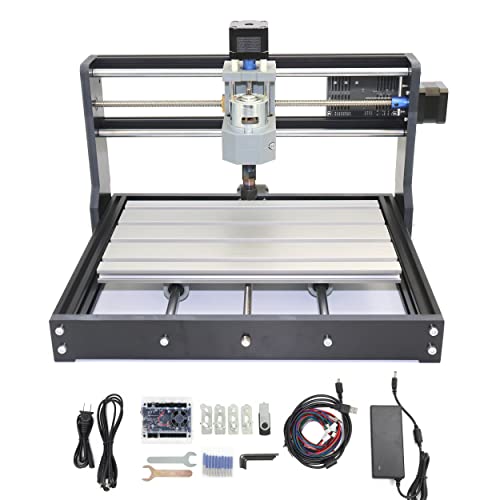
Designed with DIY carving enthusiasts and beginners in mind, the RATTMMOTOR DIY CNC Router Kit offers an accessible entry point into the world of CNC machining. With a working area of 300x180x45mm, this kit features a robust aluminum alloy frame and stainless steel screw rods, ensuring high precision and durability. The easy assembly process, supported by a manual and USB files, makes it user-friendly. You’ll appreciate the updated GRBL control board, complete with an emergency stop button and silent cooling fan. Perfect for engraving wood, plastics, and soft metals, this kit is your ideal companion for creative projects!
Best For: DIY carving enthusiasts and beginners looking to explore CNC machining with a user-friendly kit.
Pros:
- Easy assembly with included manual and USB flash drive for guidance.
- High precision and durability with a robust aluminum alloy frame.
- Capable of engraving a variety of materials including wood, plastics, and soft metals.
Cons:
- Limited working area may not suit larger projects.
- Not suitable for engraving harder materials such as glass or hard metals.
- Requires additional setup for advanced users beyond basic operation.
CNC Router Machine TTC450 Pro for Woodworking

With its versatile design and compatibility with various materials like wood, acrylic, and MDF, the CNC Router Machine TTC450 Pro makes an excellent choice for woodworking enthusiasts and professionals alike. This 3-axis engraving machine features a spacious working area of 18.1” x 18.1” x 3.1” and supports multiple spindle options for enhanced functionality. Its dual NEMA 42 stepper motors guarantee precision and low noise, while the user-friendly setup takes less than 30 minutes. With robust safety features and compatibility with popular software like Fusion360, you’ll enjoy a seamless experience crafting intricate designs with ease.
Best For: The CNC Router Machine TTC450 Pro is best for woodworking enthusiasts and professionals seeking a versatile and precise engraving solution.
Pros:
- Versatile Compatibility: Supports a variety of materials such as wood, acrylic, and MDF, along with multiple spindle options for enhanced functionality.
- User-Friendly Setup: Main parts come pre-assembled, allowing for an easy assembly process in under 30 minutes with clear instructions.
- High Precision and Performance: Equipped with dual NEMA 42 stepper motors for improved torque and low noise, ensuring precise and stable operation.
Cons:
- Limited Working Area: The effective working area of 18.1” x 18.1” x 3.1” might not be sufficient for larger projects.
- Requires Software Familiarity: Users need to be familiar with compatible programming software like Fusion360 to maximize the machine’s capabilities.
- Potential Technical Limitations: Performance may be affected by the complexity of designs, requiring careful planning and adjustments for intricate projects.
SainSmart Genmitsu 3018-PROVer V2 CNC Router Machine for Beginners

The SainSmart Genmitsu 3018-PROVer V2 CNC Router Machine stands out as an exceptional choice for beginners enthusiastic to plunge into the world of CNC machining. This mini milling engraver kit offers easy assembly with pre-assembled parts, allowing you to set it up in under an hour. It’s perfect for engraving wood, acrylic, and plastics, making it ideal for creating artwork or personalized gifts. With features like limit switches and an E-Stop, safety is prioritized. Plus, you can enhance functionality with accessories like extension kits. The included CAD/CAM software makes design and GCode conversion a breeze, ensuring you’re ready to create.
Best For: The SainSmart Genmitsu 3018-PROVer V2 CNC Router Machine is best for beginners looking to explore CNC machining and create personalized artwork or gifts.
Pros:
- Easy assembly with pre-assembled parts, allowing setup in under an hour.
- Versatile in engraving a wide range of materials, including wood, acrylic, and plastics.
- Includes safety features such as limit switches and an E-Stop for added security.
Cons:
- Limited to soft materials; not suitable for hard metals or complex tasks without upgrades.
- Requires CAD/CAM software for design and GCode conversion, which may be challenging for complete beginners.
- Additional accessories for enhanced functionality can increase overall cost.
CNCTOPBAOS CNC 3018-PRO-MAX 3 Axis Desktop Mini Wood Router Kit

For those venturing into the world of CNC milling, the CNCTOPBAOS CNC 3018-PRO-MAX 3 Axis Desktop Mini Wood Router Kit stands out as an excellent entry-level choice. With a working area of 30x18x4.5cm, it’s perfect for small projects. This kit features a powerful 775 120W spindle motor and a user-friendly offline controller with an SD card reader. While assembly can be a bit challenging, its solid construction and compatibility with various materials make it a great learning tool. Just remember to use a spoil board and practice patience as you navigate through the initial setup and operations.
Best For: Beginners looking to explore CNC milling with a compact and user-friendly machine for small projects.
Pros:
- Easy assembly and solid construction, making it suitable for beginners.
- Versatile compatibility with various materials such as wood, acrylic, and soft metals.
- User-friendly offline controller with SD card reader for convenient G-code file management.
Cons:
- Initial setup challenges may require patience and practice to overcome.
- Inaccuracies in measurements can occur when using software versus offline control.
- Not ideal for deep cuts or larger projects without potential modifications.
Factors to Consider When Choosing Cnc Router Kits
When choosing a CNC router kit, you’ll want to take into account several key factors. Start with the working area size and material compatibility to guarantee it fits your project needs. Don’t forget to look at assembly complexity, power and speed, and software compatibility to make certain you get the best match for your skills and goals.
Working Area Size
Choosing the right working area size for your CNC router kit is essential, as it shapes the scale and complexity of your projects. Common sizes range from 300 x 180 mm to 800 x 400 mm. A larger working area enables you to tackle bigger, more complex projects like furniture parts, while a smaller area restricts you to intricate designs and smaller components. Keep in mind that deeper cuts require additional Z-axis clearance, so factor in material thickness when selecting your kit. Make certain the working area aligns with your intended applications and fits your workspace. This guarantees that you can comfortably operate your CNC router without constraints, maximizing both your creativity and efficiency.
Material Compatibility
Understanding material compatibility is essential for selecting the right CNC router kit, as it directly impacts the quality and success of your projects. Different kits can handle various materials like wood, acrylic, PVC, and soft metals such as copper and aluminum. Some machines excel with lighter materials, while others are built for tougher substances like aluminum or MDF, requiring more powerful spindles and motors. Keep in mind that the engraving area size can limit your material options, especially for larger projects. Additionally, maximum spindle speeds vary among routers; softer materials often need higher speeds, while harder ones perform better at lower speeds. Choose wisely to avoid machine damage and guarantee high-quality outputs.
Assembly Complexity
While exploring CNC router kits, you’ll quickly notice that assembly complexity can vary widely, impacting your overall experience. Some kits can be set up in just 10-15 minutes, while others may take over an hour. If you’re a beginner, look for kits with detailed manuals and online resources to ease the process. Features like a dust-proof controller and emergency stop buttons not only enhance safety but also simplify electronic assembly. Additionally, some kits eliminate the need for positioning components, making the setup easier and more accurate. Finally, consider the overall design; kits with all-metal frameworks or pre-assembled parts typically offer a smoother assembly experience and better long-term performance.
Power and Speed
After getting a handle on assembly complexity, it’s time to contemplate power and speed, which play a significant role in the performance of CNC router kits. The power of your CNC router, measured in watts, typically ranges from 300W to 400W for hobby machines, affecting its ability to cut through materials like wood and soft metals. Spindle speed is essential too, with maximum RPMs between 10,000 and 20,000. Higher speeds excel in fine engraving, while lower speeds are better for cutting thicker materials. Don’t overlook torque; higher torque models maintain speed under load for consistent performance. Look for routers with variable speed settings to optimize for various materials, and verify your power supply meets the machine’s specifications to avoid overheating.
Software Compatibility
When selecting a CNC router kit, software compatibility is a key factor that can greatly impact your project outcomes. You’ll want to reflect on which design and control software you prefer, such as GRBL, Fusion360, or Easel, as each offers different levels of support and functionality. Some kits come with proprietary software, while others are compatible with open-source programs, giving you flexibility. Make sure the kit supports the file formats you plan to use, like G-code (.nc/.gcode), as this affects operational capabilities. Additionally, check if any software needs extra plugins or configurations to work effectively with your hardware. Finally, a user-friendly interface and plenty of tutorials can help ease your learning curve, especially if you’re a beginner.
Build Quality
Build quality is essential for ensuring your CNC router kit performs reliably and meets your project demands. When choosing a kit, pay attention to the materials used; aluminum alloy frames offer an excellent balance of strength and weight. Look for robust designs with dual linear rails on the Z-axis, as these enhance precision and minimize vibrations. Thicker components, like base plates and extrusions, typically indicate a more stable and durable machine. Consider effective assembly designs that include pre-assembled parts and clear instructions for quick setup without compromising structural integrity. Finally, features like dust-proof controllers and emergency stop functions not only enhance safety but also contribute to the longevity of your CNC router, reflecting thoughtful engineering in its build quality.
Upgrade Options
Considering upgrade options is essential for maximizing the potential of your CNC router kit. Many kits allow you to enhance capabilities with larger spindle motors or additional axis extensions, expanding your working area for bigger projects. Investing in extension kits can open the door to more complex designs, ensuring your router meets your evolving needs. Compatibility with various spindle clamps lets you upgrade to specialized spindles, boosting speed and performance. Furthermore, enhancing components like motors and controllers can greatly improve precision and overall functionality, which is vital for demanding projects. Don’t forget about accessories like spoilboards and software, as they can increase versatility and efficiency for different materials and applications, making your CNC experience even better.
Cost Considerations
Cost plays an essential role in selecting the right CNC router kit for your projects. Initial prices can range from a few hundred to several thousand dollars, depending on features and capabilities. Don’t forget to account for additional expenses, like accessories, software, and maintenance, which can add 10-30% to your overall investment. Also, consider consumables like cutting bits and materials, as they affect long-term costs. Many kits offer optional upgrades, such as more powerful spindles, which may increase upfront costs but boost functionality. Finally, look into warranty and customer support availability; good support can save you money on repairs and replacements, making it a vital factor in your cost evaluation.